Showing posts with label launcher. Show all posts

Next Launcher 3D v1.38


Description
The top rated 3D launcher - Next Launcher 3D, will show you how 3D dynamic and highly customizable home screen replacement app could redefine your Android Launcher - Extend imagination, extend capabilities! Now, upgrade your outdated launcher to Next Launcher and embrace the next generation of user interface to your phone! 
Features
√ Stereoscopic Screen Preview
Stunning 3D screen preview with dazzling animation of screen switching enables you to access to, add, set home screen, and delete any screen on your launcher in a second.
√Theme Mix Mode
Choose different theme styles for different elements (icon, folder, dock bar, and preview screen panel) respectively. Design the ultimate UI look you desire with Theme Mix Mode.
√Enhanced Home Screen Transition Effect Border
Enable it through Next Key and experience stronger 3D visual effect when flipping home screen.
√Elements Floating Mode 
Show how cool your phone can be to your friends!
All the elements on home screen float like the cloud. Blow your microphone or make voices to fasten the floating speed.
√ Multi-select Apps
After selecting one app, use sliding gesture to multi-select the other apps. The fantastic interaction designs not only to wow people, but save efforts to fulfill batch operation on Android launcher home.
√ Customizing Home Screen
Packed with unlimited screen layout function, you may place icons, folders, or widgets randomly on your screen. Change 3D themes and wallpapers to reclaim your launcher home interface.
√ Icons
Icons support rotation, replace, Multi-select, align and so on. Operation is easy and fantastic. Multi-select apps, long press one of the selected apps to gather them, and draw a preview path by selecting operation from app icon menu.
√ Rotatable Dock
Invert the dock upward or downward to switch among Android launcher home, preview and editing modes.
√ App Drawer
Icons can be arranged by name or time. You can create folders by overlapping app icons. That batch operation to add icons on Android home is also available.
√ 3D Widgets & Themes & Live Wallpapers
Popular widgets in 3D space including switch, music, and clock have been released, with weather, task manager, calendar, notification widgets coming soon. Numerous of 3D themes and live wallpapers are being prepared for the launcher.
Redefine Your Android phone with Next Launcher 3D right now!
Changelog
V1.38
1.(New) New operation of icon effects setting (click Next key -> Icon effects)
2.(Reduce) Reloading frequency
3.(Improve)UI2.0
4.(Fixed) Some FC bugs
Download
>> Howfile
>> Zippyshare


Next Launcher 3D v1.36


Description
The top rated 3D launcher - Next Launcher 3D, will show you how 3D dynamic and highly customizable home screen replacement app could redefine your Android Launcher - Extend imagination, extend capabilities! Now, upgrade your outdated launcher to Next Launcher and embrace the next generation of user interface to your phone! 
Features
√ Stereoscopic Screen Preview
Stunning 3D screen preview with dazzling animation of screen switching enables you to access to, add, set home screen, and delete any screen on your launcher in a second.
√Theme Mix Mode
Choose different theme styles for different elements (icon, folder, dock bar, and preview screen panel) respectively. Design the ultimate UI look you desire with Theme Mix Mode.
√Enhanced Home Screen Transition Effect Border
Enable it through Next Key and experience stronger 3D visual effect when flipping home screen.
√Elements Floating Mode 
Show how cool your phone can be to your friends!
All the elements on home screen float like the cloud. Blow your microphone or make voices to fasten the floating speed.
√ Multi-select Apps
After selecting one app, use sliding gesture to multi-select the other apps. The fantastic interaction designs not only to wow people, but save efforts to fulfill batch operation on Android launcher home.
√ Customizing Home Screen
Packed with unlimited screen layout function, you may place icons, folders, or widgets randomly on your screen. Change 3D themes and wallpapers to reclaim your launcher home interface.
√ Icons
Icons support rotation, replace, Multi-select, align and so on. Operation is easy and fantastic. Multi-select apps, long press one of the selected apps to gather them, and draw a preview path by selecting operation from app icon menu.
√ Rotatable Dock
Invert the dock upward or downward to switch among Android launcher home, preview and editing modes.
√ App Drawer
Icons can be arranged by name or time. You can create folders by overlapping app icons. That batch operation to add icons on Android home is also available.
√ 3D Widgets & Themes & Live Wallpapers
Popular widgets in 3D space including switch, music, and clock have been released, with weather, task manager, calendar, notification widgets coming soon. Numerous of 3D themes and live wallpapers are being prepared for the launcher.
Redefine Your Android phone with Next Launcher 3D right now!
Changelog
V1.36
1.(New) Glass and Gradual change homescreen transition effects
2.(New) Folding 3D homescreen transition effects
3.(New) Support hiding dock's background(Menu—>Dock settings—>Hide dock's background)
4.(Fixed) Some FC bugs
Download
 

Action Launcher Pro v1.8.0


Description
★★★ Featured by Engadget, Lifehacker and Leo Laporte on TWiT ★★★
★★★ "Action Launcher is something special." - Android Police ★★★
★★★ "Action Launcher brings something new to the table, and it's definitely worth a look." - Android Central ★★★
Action Launcher re-imagines the concept of an Android launcher. Put simply, Action Launcher is designed to get you where you need to go, faster.
It looks and feels like a natural launching pad for the Android ecosystem.
Standout features include:
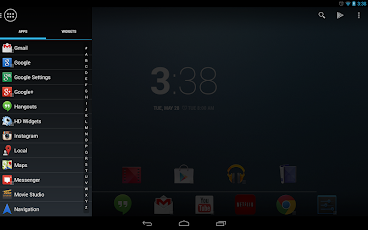
* A sliding quickdrawer for instant access to all your apps and widgets.
* 'Covers', an innovative new way to quickly launch apps and shortcuts without compromising the look of your carefully crafted homescreen.
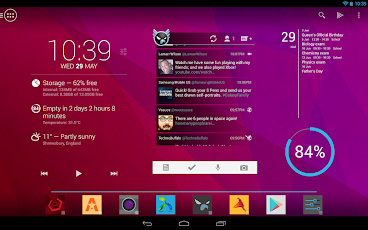
* 'Shutters', a unique feature that unlocks the power and potential of Android widgets. Swipe an app icon, and that app's widget is automatically created.
* Quicksearch, a fast and powerful feature that allows you to search for apps, contacts and even music directly from the action bar.
* Android's unique and powerful action bar is fully integrated into your desktop.
* Full tablet support (including the Nexus 10).
* Icon pack support.
* Desktop layouts can be backed up and restored to and from an SD card.
* All of the settings you expect from custom launcher: specify apps to hide, adjustable number of home screen pages, grid sizes, page margins, dock toggles, scaling icons, lock desktop, resize any widget, etc.
* Strong Play Store integration.
Action Launcher allows you to import from existing launcher layout from other launchers such as Apex, Nova, Sense, TouchWiz and the stock Android launcher, so you'll instantly feel right at home.
Changelog
[1.8.0]
NEW: The widget displayed on a shutter can be changed.
NEW: Any app shortcut can be configured as a shutter, whether that app has a widget or not. Just pick up & put down the shortcut in the same grid location, then select 'Create shutter'.
NEW: Shutters are available for Ice Cream Sandwich users.
NEW: Increase the max grid size to 12x12 for phones and tablets.
NEW: Add the ability to scale the size of Home screen icons.
NEW: SD card backups.
Download

Next Launcher 3D v1.35


Description
The top rated 3D launcher - Next Launcher 3D, will show you how 3D dynamic and highly customizable home screen replacement app could redefine your Android Launcher - Extend imagination, extend capabilities! Now, upgrade your outdated launcher to Next Launcher and embrace the next generation of user interface to your phone! Do not forget to rate us when you're satisfied with Next Launcher 3D!
Notice
We introduced the following permission to support our new function – Migrate home screen from other launchers
com.htc.launcher.permission.READ_SETTINGS – Migrate from HTC sense
com.lge.launcher.permission.READ_SETTINGS – Migrate from LG Home
com.fede.launcher.permission.READ_SETTINGS – Migrate from LauncherPro
org.adw.launcher.permission.READ_SETTINGS – Migrate from ADW Launcher
org.adwfreak.launcher.permission.READ_SETTINGS – Migrate from ADW Launcher EX
org.adw.launcher_donut.permission.READ_SETTINGS – Migrate from ADW Launcher donut
Features
√ Stereoscopic Screen Preview
Stunning 3D screen preview with dazzling animation of screen switching enables you to access to, add, set home screen, and delete any screen on your launcher in a second.
√Theme Mix Mode
Choose different theme styles for different elements (icon, folder, dock bar, and preview screen panel) respectively. Design the ultimate UI look you desire with Theme Mix Mode.
√Enhanced Home Screen Transition Effect Border
Enable it through Next Key and experience stronger 3D visual effect when flipping home screen.
√Elements Floating Mode 
Show how cool your phone can be to your friends!
All the elements on home screen float like the cloud. Blow your microphone or make voices to fasten the floating speed.
√ Multi-select Apps
After selecting one app, use sliding gesture to multi-select the other apps. The fantastic interaction designs not only to wow people, but save efforts to fulfill batch operation on Android launcher home.
√ Customizing Home Screen
Packed with unlimited screen layout function, you may place icons, folders, or widgets randomly on your screen. Change 3D themes and wallpapers to reclaim your launcher home interface.
√ Icons
Icons support rotation, replace, Multi-select, align and so on. Operation is easy and fantastic. Multi-select apps, long press one of the selected apps to gather them, and draw a preview path by selecting operation from app icon menu.
√ Rotatable Dock
Invert the dock upward or downward to switch among Android launcher home, preview and editing modes.
√ App Drawer
Icons can be arranged by name or time. You can create folders by overlapping app icons. That batch operation to add icons on Android home is also available.
√ 3D Widgets & Themes & Live Wallpapers
Popular widgets in 3D space including switch, music, and clock have been released, with weather, task manager, calendar, notification widgets coming soon. Numerous of 3D themes and live wallpapers are being prepared for the launcher.
Redefine Your Android phone with Next Launcher 3D right now!


Download
Follow Us

About Us

We provide you with thousands of applications and games for Android
© Droid First All rights reserved | Theme Designed by Seo Blogger Templates