Showing posts with label pro. Show all posts

Advanced Task Manager Pro v3.1.3


Description
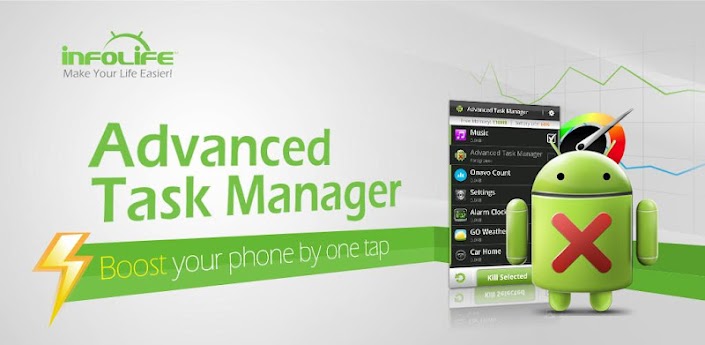
Kill tasks,free memory,speed up phone,save battery.
#Feature
*Kill selected tasks
*Android optimizer & booster
*Ignore apps when kill tasks
*Auto kill tasks on every screen off
*Regular kill
*Startup Kill
*One click task kill widget
*Quick uninstaller
*Show battery life
*Support android 1.5/1.6/2.2/2.3/3.x/4.0
*Ad Free
#FAQ
Q: Why do apps restart again?
A: Some apps are restarted by system events apps cannot be prevented from restarting because of the limitation of the system. It is suggested to enable auto kill in settings, and it will kill tasks on every screen off. It will help to save battery life and release memory for the phone.
Q: How can I add app to ignore list?
A: You can long click on the task that you want to ignore, then you will get a poped up context menu, click "Ignore". The ignored apps will not be listed in the task list, and will never be killed. You can manage the ignored apps in settings.
Q: How can I manage startup apps?
There is "Startup Kill" in settings, it can help you to kill tasks on system startup.
Changelog
-v3.0.5
#Fix a FC bug

-v3.0.4
#Game Booster Addon
Download
>> Howfile
 

OfficeSuite Pro 7 (PDF & HD) v7.2.1283


Description
The world’s No. 1 mobile office today!
# Installed on over 100 million devices in more than 205 countries
# Over 40,000 registrations per day
# No. 1 app in Google Play Business category
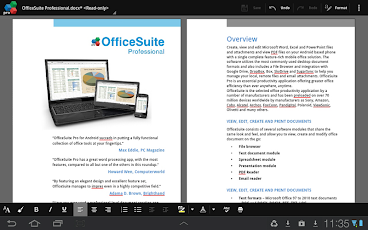
Made by MobiSystems, OfficeSuite Pro allows you to view, create, edit, print and share Word, Excel and PowerPoint files on the go. You can also open attachments and see PDF files on an Android based phone or tablet with our feature-rich mobile office solution.
OfficeSuite Pro includes a File Browser and integration with Cloud service leaders: Box, DropBox, Google Drive, SkyDrive and SugarSync to give users a multitude of options on how to manage files and attachments.
---OfficeSuite Pro 7 Out Now! New Features---
* New and improved UI
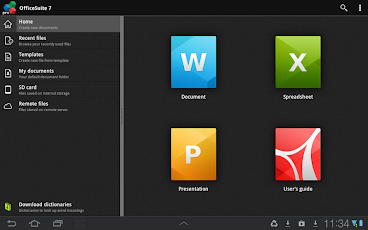
* Side bar navigation in the File Browser for quick access to different folders and remote third party cloud services
* Templates - OfficeSuite Pro 7 users can benefit from a wide range of templates, from Resume and Invoice templates to Travel Planner and Weight Loss Tracker templates, among others
* Extended Cloud support - now compatible with Microsoft SkyDrive. Google Drive support has been improved, by adding folder support, thus allowing for optimized document view
Docs Editor:
* Styles - apply MS Word styles or styles used in the document
* Table design – ability to fashion an inserted table as per our library of tailor-made designs
* Formulas (display only)
* Format painter
Spreadsheet Editor:
* Improved selection of parameters in functions
Slides Editor:
* Animations
PDF Viewing:
* A new PDF engine using library from Adobe, providing instant opening of large PDF files
* Find/Find Next
--File Formats Supported--
* Text format - DOC, DOCX, DOCM, RTF, TXT, LOG
* Spreadsheet - XLS, XLSX, XLSM, CSV
* Presentation - PPT, PPTX, PPS, PPSX, PPTM, PPSM
* Other formats - PDF, EML, ZIP
--Easy File Access and Sharing--
* With the integrated File Browser you can easily access, modify and share your local or Cloud stored files. OfficeSuite integrates with Google Drive, DropBox, Box, SugarSync and SkyDrive
* Easily open email attachments
* Work with Outlook EML files
* Share documents via Email or Bluetooth
--Intuitive and Intelligent Design--
* OfficeSuite 7 comes with new intuitive design and user experience allowing quick and intuitive workflow while you manage your files or create and modify documents.
* New side bar gives instant access to local and cloud stored files.
* Two-finger zoom, multi-touch support, context toolbars and popup menus make your work with OfficeSuite quick and fun.
--OfficeSuite Extensions--
* QuickSpell – fully integrated with OfficeSuite Pro QuickSpell will help you dramatically improve your typing accuracy.
* Font Pack – allows you to use Microsoft most used fonts in OfficeSuite text documents.
* Oxford Dictionary of English - look up word meaning in office text documents in the most popular English dictionary
** Note that OfficeSuite Extensions are sold separately. Purchasing any of the extensions is optional.**
Compatible with Sony Ericsson LiveDock™ Multimedia station.
com.sonyericsson.extras.ATTACHED
Works great on a big screen with MHL!
Changelog
Version 7.2.1283
Bugs fixed
Version 7.2.1276
* Ability to insert shapes in Word
* Right to left writing in Word for Hebrew and Arabic languages
* Export spreadsheets to PDF
* Digital keyboard for easier numbers input in Excel
* Ability to insert shapes in slides
* Export of PowerPoint documents to PDF
* Grid View in the File Explorer
* Printing to HP printers (requires HP ePrint)
Download
 

Tweetcaster Pro v7.5.1


Desription
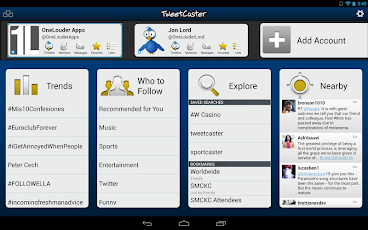
TweetCaster has a gorgeous look with an intuitive interface that makes it super easy to use while packing in tons of features. Optimized for both phones and tablets, TweetCaster has been highly praised by users and reviewers.
Features:
* Multiple Twitter Accounts – Manage and easily post to multiple Twitter accounts
* Facebook – Simultaneously post to Twitter and Facebook
* Notifications – Get notified of new tweets, mentions, messages, or by specific user. Notifications are expandable and actionable on Android 4.1+
* Photo Effects – Add cool filters, effects and captions to photos, as you upload them
* Zip It – Zip annoying tweeters or keywords from your timeline without unfollowing
* Widgets – multiple widgets, including one that is scrollable and sizeable (Android 3.0+)!
* Themes – Twelve vibrant, colorful themes
* Sync between devices – Keep your place in the timeline across multiple devices and web using TweetCaster.com
* Smart Filter – Filter your timeline to look only at tweets with photos, links, videos, or hide retweets or replies
* Search Party – How Twitter search was meant to be! Lets you search just your own timeline, someone else’s, or all of Twitter.
* Smart Lists – The best way to use Twitter Lists, including robust list management and viewing tools
* My Stats – Up-to-the-minute tally of stats includes Most Retweeted, Most Mentioned, Most Favorited, & many more
* Photo previews – View previews and open photos from most image services, including Instagram
* Speak Tweets – Tap microphone on New Tweet screen to speak instead of typing
* Schedule Tweets – Compose a tweet and send later or send to Buffer
* Read Later – Save links to read/view later using Pocket, Instapaper, or Readability
* Streaming – Tweets are streaming in real-time when connect via WiFi
* Readability – View links in Readability mode for a mobile-optimized view
* Color Code Tweets –Color code your Tweets and mentions
* Long Tweets – Use Twitlonger to tweet over 140 characters
* Who to Follow – Suggests people to follow
Changelog
+ Fixed Twitter photo upload bug
+ Removed Interactions option due to Twitter API changes
+ Twipple image preview support
Download
 

Action Launcher Pro v1.8.0


Description
★★★ Featured by Engadget, Lifehacker and Leo Laporte on TWiT ★★★
★★★ "Action Launcher is something special." - Android Police ★★★
★★★ "Action Launcher brings something new to the table, and it's definitely worth a look." - Android Central ★★★
Action Launcher re-imagines the concept of an Android launcher. Put simply, Action Launcher is designed to get you where you need to go, faster.
It looks and feels like a natural launching pad for the Android ecosystem.
Standout features include:
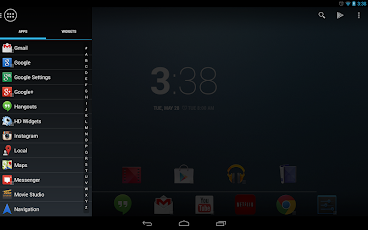
* A sliding quickdrawer for instant access to all your apps and widgets.
* 'Covers', an innovative new way to quickly launch apps and shortcuts without compromising the look of your carefully crafted homescreen.
* 'Shutters', a unique feature that unlocks the power and potential of Android widgets. Swipe an app icon, and that app's widget is automatically created.
* Quicksearch, a fast and powerful feature that allows you to search for apps, contacts and even music directly from the action bar.
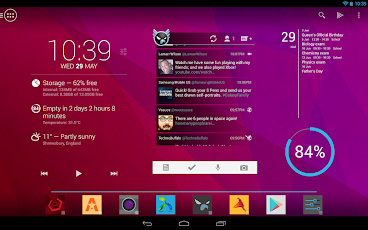
* Android's unique and powerful action bar is fully integrated into your desktop.
* Full tablet support (including the Nexus 10).
* Icon pack support.
* Desktop layouts can be backed up and restored to and from an SD card.
* All of the settings you expect from custom launcher: specify apps to hide, adjustable number of home screen pages, grid sizes, page margins, dock toggles, scaling icons, lock desktop, resize any widget, etc.
* Strong Play Store integration.
Action Launcher allows you to import from existing launcher layout from other launchers such as Apex, Nova, Sense, TouchWiz and the stock Android launcher, so you'll instantly feel right at home.
Changelog
[1.8.0]
NEW: The widget displayed on a shutter can be changed.
NEW: Any app shortcut can be configured as a shutter, whether that app has a widget or not. Just pick up & put down the shortcut in the same grid location, then select 'Create shutter'.
NEW: Shutters are available for Ice Cream Sandwich users.
NEW: Increase the max grid size to 12x12 for phones and tablets.
NEW: Add the ability to scale the size of Home screen icons.
NEW: SD card backups.
Download

Falcon Pro v2.0

Falcon Pro brings the Ultimate Twitter Experience to your Android Phone and Tablet.
Looking for a Twitter app with an Innovative UI, Buttery animations, Extra fast loading times and Unique Features ? Look no further, Falcon Pro is what you need.
::::: Falcon Pro Features :::::
* Double Sliding Menu UI like you've never seen before
* Beautiful Phone and Tablet UI
* Extra smooth scrolling
* Real Time, Expandable notifications
* Super fast internal browser with Instapaper integration
* Offline favoriting
* Tweet Drafts
* Inline preview of Photos and Videos
* TweetMarker support to use on multiple devices
* In-app preview of Play Store links
* Zoomable pics
* See your most popular tweets
* Fast access to Saved Searches and Lists
* Embedded Youtube player
* Dark & Light themes
* Inline preview for links and articles
* Offline access to your favorite users
* Individual user notifications
* Inline articles
* Scrollable widget
* Quick Actions widget
* Full offline mode !
+ All core features you would expect from a mobile Twitter client, and much more.
Falcon Pro is fast and smooth on phones and tablets running Android 2.2 and above.

Changelog
v2.0
- NEW : Multi Account Support
- NEW : Flat design UI
- NEW : Black Theme
- NEW : Option to Swipe between columns (Android 3+)
- NEW : Transition animations (Android 3+)
+ Bugfixes and improvements
Download
- Filesear
- Zippyshare

Titanium Backup PRO v6.0.1

☆Needs ROOT, Android 1.5-4.2+ (ARM,x86,MIPS)
☆Over 8 million users, 29+ languages.
☆Voted #1 TOP ROOT APP on Twitter.
☆Problem? See titaniumtrack.com/kb
☆Scroll down for more info & DEMO VIDEOS ;-)

Titanium Backup is the most powerful backup tool on Android, and then some.

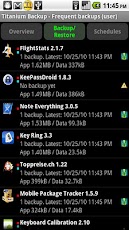
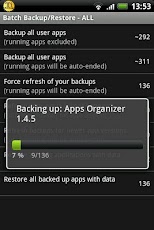
You can backup, restore, freeze (with Pro) your apps + data + Market links. This includes all protected apps & system apps, plus external data on your SD card. You can do 0-click batch & scheduled backups. Backups will operate without closing any apps (with Pro). You can move any app (or app data) to/from the SD card. You can browse any app's data and even query the Market to see detailed information about the app.

Also see the paid PRO key which adds EVEN MORE awesome features such as:
[✔] 0-click batch restores
[✔] Keep multiple backups per app
[✔] Backup/restore SMS,MMS,calls,bookmarks,Wi-Fi AP as XML
[✔] Multi-user app data
[✔] Apps freezer
[✔] Sync to/from Dropbox (manual/scheduled)
[✔] Sync to/from Box (manual/scheduled)
[✔] Sync to/from Google Drive (manual/scheduled)
[✔] TB Web Server: download/upload your backups as a single ZIP on your computer
[✔] Convert user apps <=> system apps
[✔] Integrate system app updates into ROM
[✔] Encryption
[✔] Market Doctor (relink apps to Market)
[✔] "Destroy all Market links" feature
[✔] Hypershell speed
[✔] Backup apps without closing them!
[✔] Create your own update.zip containing apps+data!
[✔] Restore individual apps+data from non-root ADB backups!
[✔] Restore individual apps+data from CWM backups!
[✔] Restore individual apps+data from TWRP backups!
[✔] Market "auto updating" manager
[✔] Dalvik cache cleaner
[✔] Integrate Dalvik cache system elements into ROM
[✔] Unlimited schedules
[✔] Load/Save a Filter and use it in Widgets/Schedules
[✔] Change the device's Android ID, restore it from a backup or after a factory reset
[✔] Protect backup against deletion
[✔] Send backup (to e-mail/cloud) and import it in 1 click
[✔] Backup→Verify→Un-install an app in one shot
[✔] Freeze/defrost/launch apps in a single click
[✔] CSV export any app DB (e-mail or Google Docs)
[✔] Convert app data to/from fast WAL format
[✔] WAY MORE!

Download APK

Filesear

Sendspace

Zippyshare

RAM Manager Pro v4.4.1


This application optimizes the RAM of all android devices and improves the performance in all directions. We tested the best RAM balance which makes your system as fast as possible. Lots of running applications with enough free memory will not be a problem for your device. This is the best solution for all who have problem with the free memory, with the multitasking, with slow swapping between applications or with low performance.
ADVANTAGES OF PRO:
★No ads
★All features
★Widget
★Faster support
★More frequent updates
★You can support development
FEATURES:
★Balance - Option which makes your RAM to the best optimization, this option is for everyday using. Use this option when you want to have fast phone without lags.
★Balance (More free memory) - This option is nearly the same as Balance, but this option should be advantageous for users who have more RAM than 512 MB. This option gives you more free memory but a bit reduces multitasking.
★Balance (More multitasking) - This option is nearly the same as Balance, but this option should be advantageous for users who have less RAM than 512 MB. This option gives you more multitasking, but a bit reduces free memory.
★Hard gaming - Option which stabilizes your RAM for playing hardest games. Use this option for games which lag on your phone. Your games will run smooth without lags.
★Hard gaming (Less aggressive) - This option is similar to Hard gaming but should be better for devices with RAM lesser than 512MB.
★Hard multitasking - Option for users which are really hard working on their phones. You can have a lot of running apps and quickly switch between them without lags.
★Default (Samsung) - Default settings by Samsung, these settings are also used by LG, HTC, etc.
★Default (Nexus S) - Default settings which are used by all Google devices.
★Default - This option reverts your RAM to your default settings, which you had before you installed this app.
★Set on boot - Saves all your settings on boot
★Lock launcher in memory - Prevents restarting your launcher
★VM Heap size - It is a maximal size in MB which application can use for its data
★Swap file - Improves a performance but may degrade your SD card life
★Memory info - Shows informations of your memory
★Memory graph - Shows your free and used memory
★Widget (Light or dark theme)
★You can switch between all options without rebooting
★Languages - English, Czech, Slovak, Korean, Italian, Croatian, Polish, French, Russian, Greek
DO NOT USE RAM SCRIPTS AND TWEAKS!!!

Download
Follow Us

About Us

We provide you with thousands of applications and games for Android
© Droid First All rights reserved | Theme Designed by Seo Blogger Templates